
LaTeX never wraps text in l, c or r columns, so a long cell runs past the margin. The fix is always the same idea: tell LaTeX how wide the column may be.
Methods covered:
- Fixed-width
p{},m{}andb{}columns - Automatic widths with tabularx
- Manual line breaks with
\newlineand makecell - Wrapping text in merged cells
- Multi-page tables with xltabular or longtable
- The modern tabularray package
Why text overflows in a basic table
Use this section to understand the problem before picking a fix. The tabular environment sizes l, c and r columns to their widest entry and never breaks lines inside them.
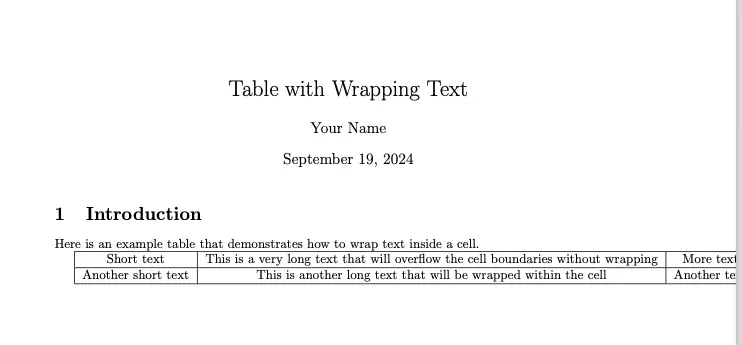
\begin{tabular}{|c|c|c|}\hlineShort text & This is a very long text that will overflow the cell boundaries without wrapping & More text \\\hline\end{tabular}The middle column grows until the table runs off the page, as the output below shows.
Wrap text with fixed-width p columns
Use this when you know roughly how wide each column should be. Replace l, c or r with p{width}, and text in that column wraps at the given width.
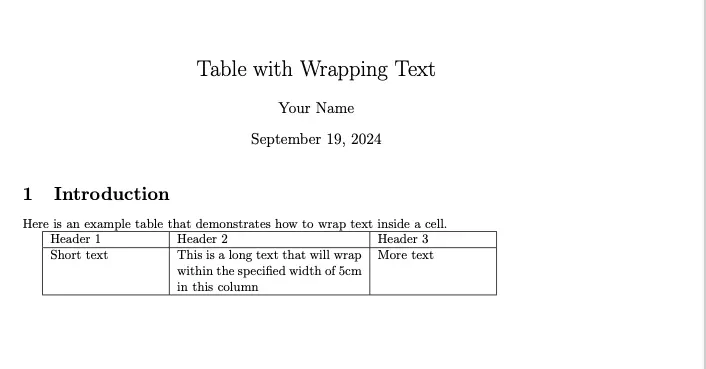
\begin{tabular}{|p{3cm}|p{5cm}|p{3cm}|}\hlineHeader 1 & Header 2 & Header 3 \\\hlineShort text & This is a long text that will wrap within the specified width of 5cm in this column & More text \\\hline\end{tabular}Result: the long entry breaks onto several lines inside its 5 cm column.
Widths can be absolute (3cm, 1.5in) or relative to the page, such as p{0.4\textwidth}. Keep the total of all widths plus column padding below \textwidth, or the table overflows anyway.
Align wrapped text vertically with m and b
The array package adds two more fixed-width types. They control where the other cells in the row sit relative to the wrapped text:
p{width}: top-aligned (default).m{width}: vertically centred.b{width}: bottom-aligned.
\usepackage{array} % in the preamble
\begin{tabular}{|m{2cm}|m{5cm}|}\hlineCentred & This long text wraps, and the left cell is vertically centred against it. \\\hline\end{tabular}
Align wrapped text horizontally
Text in a p column is justified by default, which can leave wide gaps in narrow cells. Use the array package’s >{…} prefix to change it:
\usepackage{array} % in the preamble
\begin{tabular}{|>{\raggedright\arraybackslash}p{4cm}|>{\centering\arraybackslash}p{4cm}|}\hlineLeft-aligned wrapped text in the first column & Centred wrapped text in the last column \\\hline\end{tabular}
Warning: Always add
\arraybackslashafter\raggedright,\centeringor\raggedleft. Without it,\\in that column stops ending the row, and you get a “Misplaced \noalign” error at the next\hline.
For ragged text that still hyphenates, load the ragged2e package and use >{\RaggedRight\arraybackslash}p{4cm}.
Wrap text automatically with tabularx
Use this when the table should be exactly as wide as the text block and you don’t want to calculate widths. The tabularx package’s X column takes all the space left over and wraps text inside it.
- Add
\usepackage{tabularx}to the preamble. - Replace
tabularwithtabularxand give the total width as the first argument, usually\textwidth. - Use
Xfor every column that should stretch and wrap.
\documentclass{article}\usepackage{tabularx}
\begin{document}
\begin{table}[htbp]\centering\begin{tabularx}{\textwidth}{|l|X|X|}\hlineID & Description & Notes \\\hline1 & This long text wraps automatically; X columns share the remaining width equally. & Another long note that also wraps to fit. \\\hline\end{tabularx}\caption{Example table using tabularx for text wrapping}\end{table}
\end{document}
Result: the l column keeps its natural width, and the two X columns split the rest of \textwidth equally.
To align an X column differently, use the same prefix as before: >{\raggedright\arraybackslash}X.
Break lines inside a cell
Use this when you want to choose exactly where a line breaks. Inside a cell, \\ does not start a new line; it ends the whole row.
- In a
p,m,borXcolumn: type\newlinewhere the break should go. - In any column, including
l,candr: wrap the cell in\makecell{…}from the makecell package, and\\then breaks lines inside it.
\usepackage{makecell} % in the preamble
\begin{tabular}{|p{4cm}|c|}\hlineFirst line\newline Second line & \makecell{Line one\\Line two} \\\hline\end{tabular}
Wrap text in merged cells (multirow and multicolumn)
Use this when a wrapped label spans several rows or columns. The details matter here, because the obvious code does not wrap.
multirow
\multirow{rows}{width}{text} comes from the multirow package. The width argument decides wrapping:
*uses the text’s natural width, so the text never wraps.=uses the width of the column the cell sits in (multirow 2.0 and later).- An explicit length such as
3cmwraps at that width.
\usepackage{multirow} % in the preamble
\begin{tabular}{|p{3cm}|p{4cm}|}\hline\multirow{2}{=}{Long text that wraps inside the merged cell} & Cell 1 \\\cline{2-2} & Cell 2 \\\hline\end{tabular}
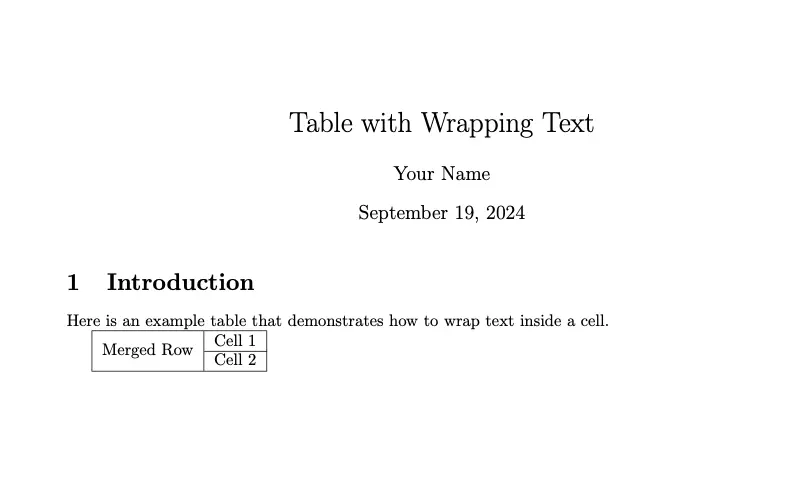
The simpler \multirow{2}{*}{Merged Row} is fine for short labels, as in this output:
Note: If the wrapped text needs more lines than the rows it spans, it spills over the rule below. Add more rows to the span, or add empty rows.
multicolumn
\multicolumn{columns}{format}{text} merges cells across columns. To wrap the merged text, give it a p format:
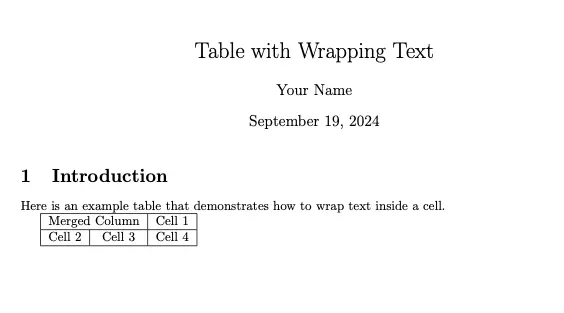
\begin{tabular}{|c|c|c|}\hline\multicolumn{2}{|p{5cm}|}{A merged header whose long text wraps across two columns} & Cell \\\hlineA & B & C \\\hline\end{tabular}With a c format instead, the merged cell is centred and does not wrap:
Wrap text in tables that span pages
Use this when the table is too long for one page. A tabular or tabularx table can’t break across pages.
Option 1: xltabular (X columns that break across pages)
The xltabular package combines longtable’s page breaking with tabularx’s X columns. X columns don’t work inside a plain longtable, so this is the package to use when you want automatic widths.
\documentclass{article}\usepackage{xltabular}
\begin{document}
\begin{xltabular}{\textwidth}{|l|X|}\hline\textbf{Step} & \textbf{Description} \\\hline\endfirsthead\hline\textbf{Step} & \textbf{Description} \\\hline\endhead\hline\endfoot1 & This long text wraps inside the X column, and the table can continue onto the next page. \\\hline2 & Another long description that wraps. \\\end{xltabular}
\end{document}
Option 2: longtable with p columns
If you prefer fixed widths, use longtable with p columns. Size them relative to \textwidth so the table stays inside the margins.
\documentclass{article}\usepackage{longtable}
\begin{document}
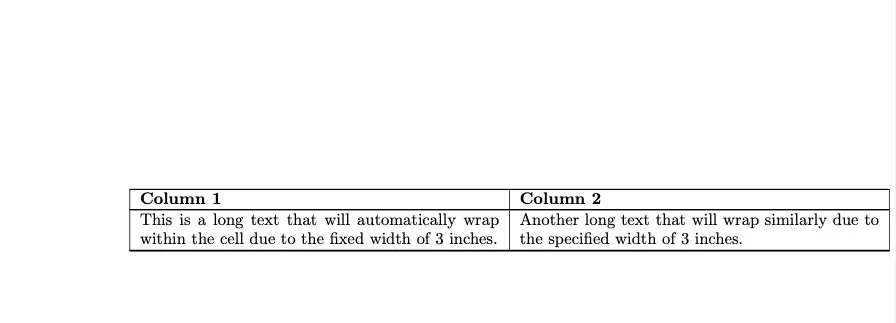
\begin{longtable}{|p{0.3\textwidth}|p{0.6\textwidth}|}\hline\textbf{Column 1} & \textbf{Column 2} \\\hline\endfirsthead\hline\textbf{Column 1} & \textbf{Column 2} \\\hline\endhead\hline\endfootLong text that wraps at 30\% of the text width. & Long text that wraps at 60\% of the text width, so the table fits inside the margins. \\\end{longtable}
\end{document}
The commands between the header rows do the multi-page work:
\endfirstheadends the header shown on the first page.\endheadends the header repeated on every later page.\endfootends the footer shown at the bottom of each page.
Wrap text with tabularray
Use this for new documents if you want one modern package for widths, spans and rules. In tabularray’s tblr environment, X columns wrap and fill the width set with width=.
\usepackage{tabularray} % in the preamble
\begin{table}[htbp]\centering\begin{tblr}{colspec={|l|X[l]|}, hlines, width=\textwidth}Item & This long text wraps automatically in a tabularray X column, which fills the available width. \\\end{tblr}\end{table}
Use X[c] for centred text and X[2] for a column twice as wide as a plain X. tabularray has its own syntax, so don’t mix its column options with array’s >{…} prefixes.
Which method should you use?
| Method | Best for | Auto width | Multi-page | Package |
|---|---|---|---|---|
p{} / m{} / b{} | Known column widths, vertical alignment | No | With longtable | Built in (m, b need array) |
tabularx X | Tables exactly \textwidth wide | Yes | No | tabularx |
xltabular X | Long tables with automatic widths | Yes | Yes | xltabular |
longtable + p{} | Long tables with fixed widths | No | Yes | longtable |
\makecell | Manual breaks in l/c/r columns | No | Yes, inside longtable | makecell |
tabularray X | New documents, one package for everything | Yes | Yes, with longtblr | tabularray |
All of these packages are part of TeX Live and MiKTeX, and Overleaf loads them without extra setup.
Special characters in table cells
Use this when a cell must show a character LaTeX treats as a command. Escape it with a backslash, or use the named command for the three that can’t be escaped that way:
| Character | Type this |
|---|---|
& % # _ $ | \& \% \# \_ \$ |
{ } | \{ \} |
^ | \textasciicircum |
~ | \textasciitilde |
\ | \textbackslash |
An unescaped & is the most common table error: LaTeX reads it as a new column and reports “Extra alignment tab has been changed to \cr”.
Common errors
- “Misplaced \noalign”: you used
\raggedrightor\centeringin the last column without\arraybackslash. - “Extra alignment tab has been changed to \cr”: a row has more
&separators than the column specification allows, often from an unescaped&in text. - “Overfull \hbox” and a table wider than the page: the
p{}widths plus padding exceed\textwidth. Use relative widths or switch to tabularx. - Text in a merged cell doesn’t wrap:
\multirow{2}{*}{…}uses natural width. Change*to=or a length. - “Undefined control sequence” with
\RaggedRight: load ragged2e, or use\raggedrightinstead. - Table floats to another page: that’s the
tableenvironment, not the wrapping. See how to label and reference your table so the reader can find it wherever it lands.
Wrapping text around an image is a different task. For that, see how to wrap text around images with wrapfig.
For more on table syntax, Overleaf’s Tables guide and the xltabular package page on CTAN cover every option. More table, figure and formatting tutorials are in our LaTeX guides.
If you later need to share the document with Word users, check how tables come through when you convert LaTeX to Word; simple p and X columns usually convert more cleanly than nested merged cells.