
In a hanging indent, the first line of each paragraph starts at the margin and the following lines are pushed in. It’s the standard layout for reference lists, works cited pages and bibliographies.
Methods in this guide:
- Indentation options for an exact value
- The ruler for a quick visual change
Using Indentation options
Use this when you need an exact value, such as the 0.5 inch most style guides ask for.
Select the paragraphs you want to format. To select the whole document, press Ctrl + A (Windows) or Cmd + A (Mac).
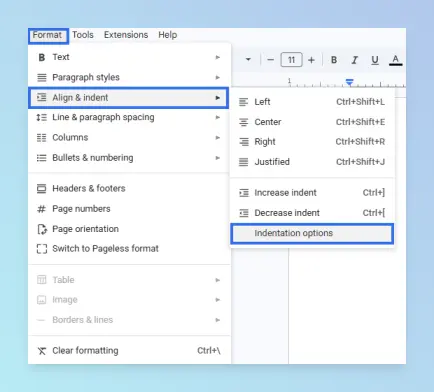
Click Format → Align & indent → Indentation options.
Under Special indent, choose Hanging.
Enter 0.5 (inches), or the value your style guide requires.
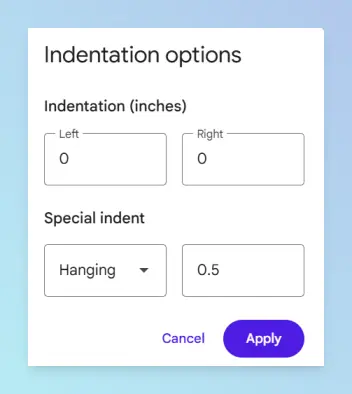
Click Apply.
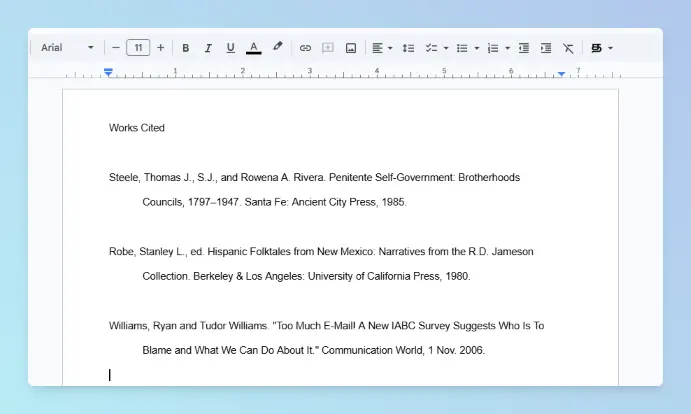
Result: The first line of each selected paragraph stays at the margin, and the lines below it move in by 0.5 inch.
Google’s paragraph formatting help covers the rest of the Align & indent menu.
Using the ruler
Use this when you want to see the change as you drag and don’t need an exact value.

The ruler has two indent markers at the left:
- The blue triangle is the left indent. It moves the whole paragraph, and the rectangle moves with it.
- The blue rectangle sits on top and sets the first-line indent only.
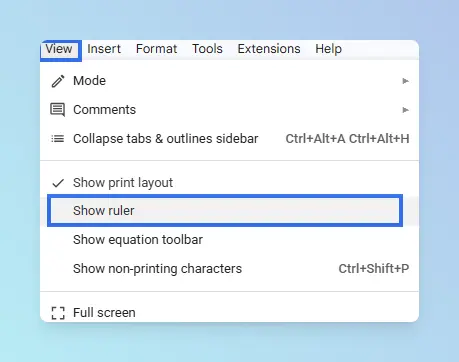
If the ruler is hidden, click View → Show ruler.
Select the paragraphs to format.
Drag the blue triangle to 0.5 inch. The rectangle moves with it.
Drag the blue rectangle back to 0 inch.
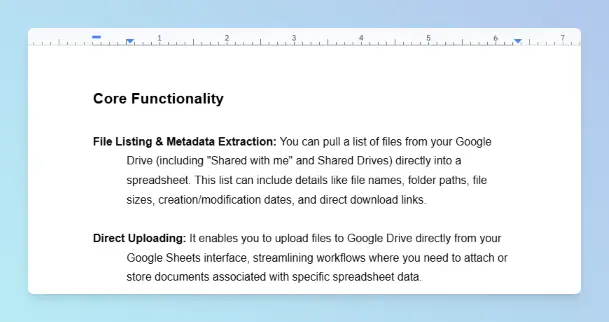
Result: Same layout as Indentation options: the first line at the margin, the rest indented.
Tip: The gray areas at the ends of the ruler are the page margins, not indents. To change those, see margins vs indents.
Comparing the two methods
| Method | Best for | Works on |
|---|---|---|
| Indentation options | Exact values for APA, MLA or Chicago reference lists | Google Docs on a computer |
| Ruler | Quick visual adjustment | Google Docs on a computer, with the ruler shown |
Style guide requirements
Use these values unless your instructor or publisher says otherwise.
- APA: reference-list entries use a 0.5-inch hanging indent, per the Purdue OWL APA reference list rules.
- MLA: works cited entries use a 0.5-inch hanging indent, per the Purdue OWL MLA works cited format.
- Metric layouts: 0.5 inch is 1.27 cm.
Troubleshooting
- Only the first paragraph changed. Select the whole reference list before you apply the indent.
- The indent disappeared after pasting. Pasted text brought its own formatting. Select it and apply the hanging indent again.
- The whole paragraph moved instead. You dragged only the triangle. Drag the rectangle back to 0.
- To remove it: open Indentation options, set Special indent to None, and click Apply.
What to do next
Reference lists usually sit at the end of a longer paper.
- Add a table of contents in Google Docs so readers can find each section.
- Submitting in Word format? Convert Google Docs to Word, then check that the reference list still has its hanging indent.
More formatting how-tos are in the Google Docs guides.